
Welcome to the Dyed4you Prayer Blog! Thank you for joining forces with us – your support is incredibly appreciated!!!
I thought it might be helpful if I gave you an overview on how this site works. I’ve given you quite a bit of access and so I want to be sure you understand what you’re able to do (and things you should and shouldn’t do). 🙂
Primarily what I encourage you to do is leave comments on existing posts – you can add prayers there, simply say amen or whatever the Lord leads! The only one notified when a comment is posted is the person who wrote the post you’re commenting on. So I encourage you to come back to posts periodically because people may have commented back on your comment. FYI, since you had to log in to view this site, you won’t have to enter any personal data when you leave a comment – it remembers you 😉
You also have what is called “Author” rights on this site. What that means is you can do more than just comment, you can create posts. Please be aware that when you create a post EVERYONE subscribed to the category your post falls in will be notified via email of your post.
I tell you this not so you won’t ever post, but so you’re aware of the impact when you do. Here are perfect examples of what would warrant creating a post for:
- You have a dream or vision that involves Dyed4you (e.g. Dream: Accredited)
- God puts a Dyed4you prayer focus on your heart (e.g. Body Image)
- While praying for Dyed4you God puts a specific scripture on your heart to pray for the ministry – when it’s posted we all can agree for it
Here’s what you should NOT post for:
- Personal prayer requests (please send those via email)
- Response to an existing post (in this case it should simply be posted at a comment)
- Anything unrelated to Dyed4you
If you have questions, feel free to contact me. If you abuse the rights you’ve been given I’ll have to revoke them (if it’s accidental, I’ll simply limit your access more; if it’s intentional, I’ll remove your account). I say this simply so you can also know I’m protecting each of YOU – because I want to be respectful of your time and inboxes!
Managing when you get an email
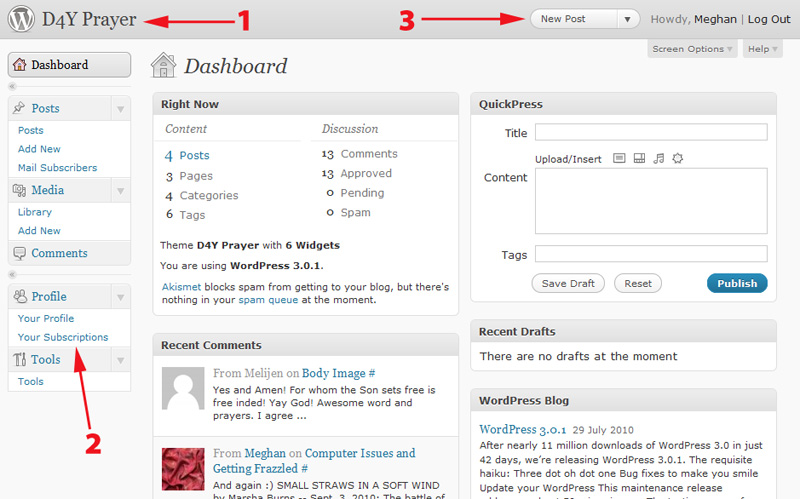
You can modify when you get an email and how they look by using the profile. When you logged into the site, you landed on what’s called the Dashboard (see image below – if you click on it, it gets bigger).
- What I’ve marked as 1 takes you to the front page of the site where you can see all the posts listed and can go in and comment, 95% when you log in that’s what you’ll want to click.
- The one marked 2 shows two parts of your profile you can update – I’ll cover the subscriptions portion more below in the section called Subscriptions, the Your Profile section is pretty self explanatory 🙂
- Finally, the spot marked 3 is what you’d click if you were writing a post. I explain more of that below on the Create/Edit Post page.
Subscriptions
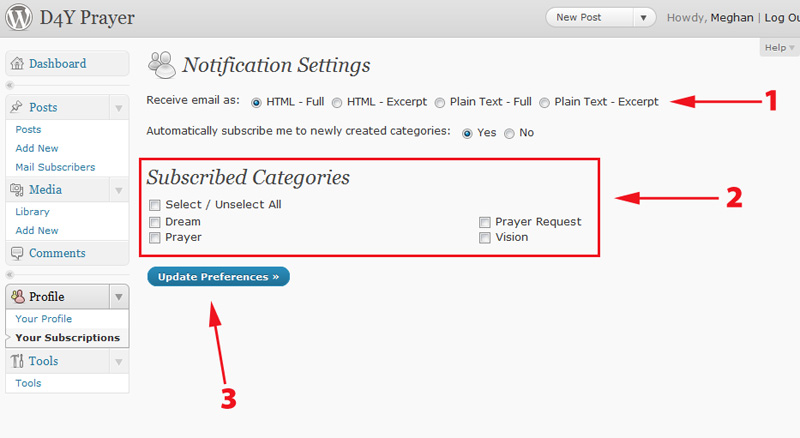
This section updates when and how you’ll get email. I’ve listed out the steps below which correspond to the numbers in the image:
- Select what type of email you want to receive
- Determine which categories you’ll receive emails on – my hope is you’ll want to receive all of them, and if it ends up being too much you can come back in and adjust this as needed.
- Click the Update Preferences button
In Conclusion
If you have any questions, concerns… please contact me! Happy to answer them and again thank you SO much for being part of the prayer covering for this ministry 🙂